LockFlare

One folder, ten servers. Checked first, and undone in one press.

A deployment is a recipe you keep: these folders on your computer, onto these servers — one box or a whole group — into this folder on each, with the commands you want run before and after. An application is one thing it sends. A website, a set of configuration files, scripts, certificates, a folder of assets are the same thing to it. Every box is asked whether it could take it before a byte moves; the upload lands beside the live folder and is verified there; the first server goes alone; and every run is kept on the server so it can be undone.

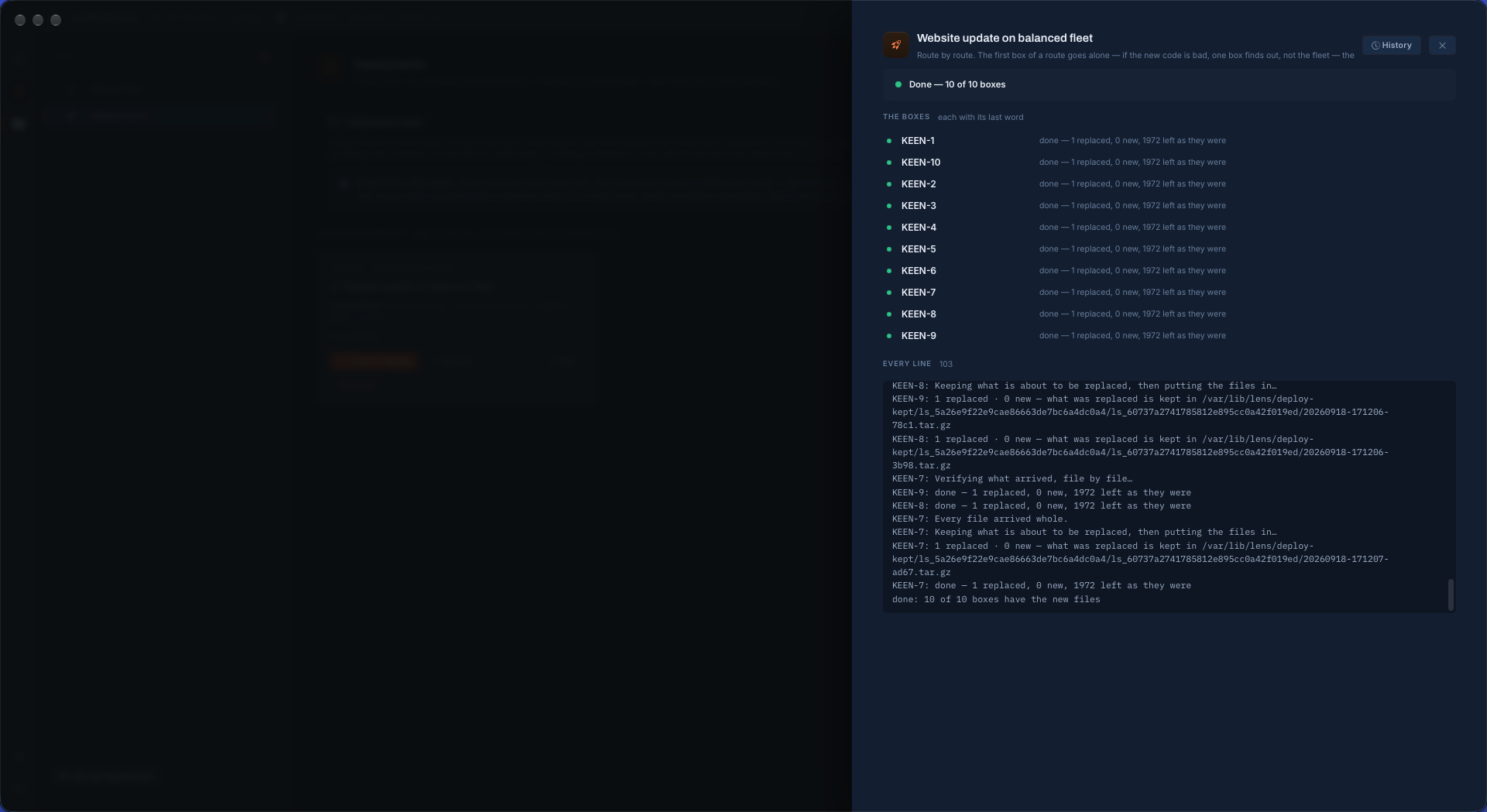
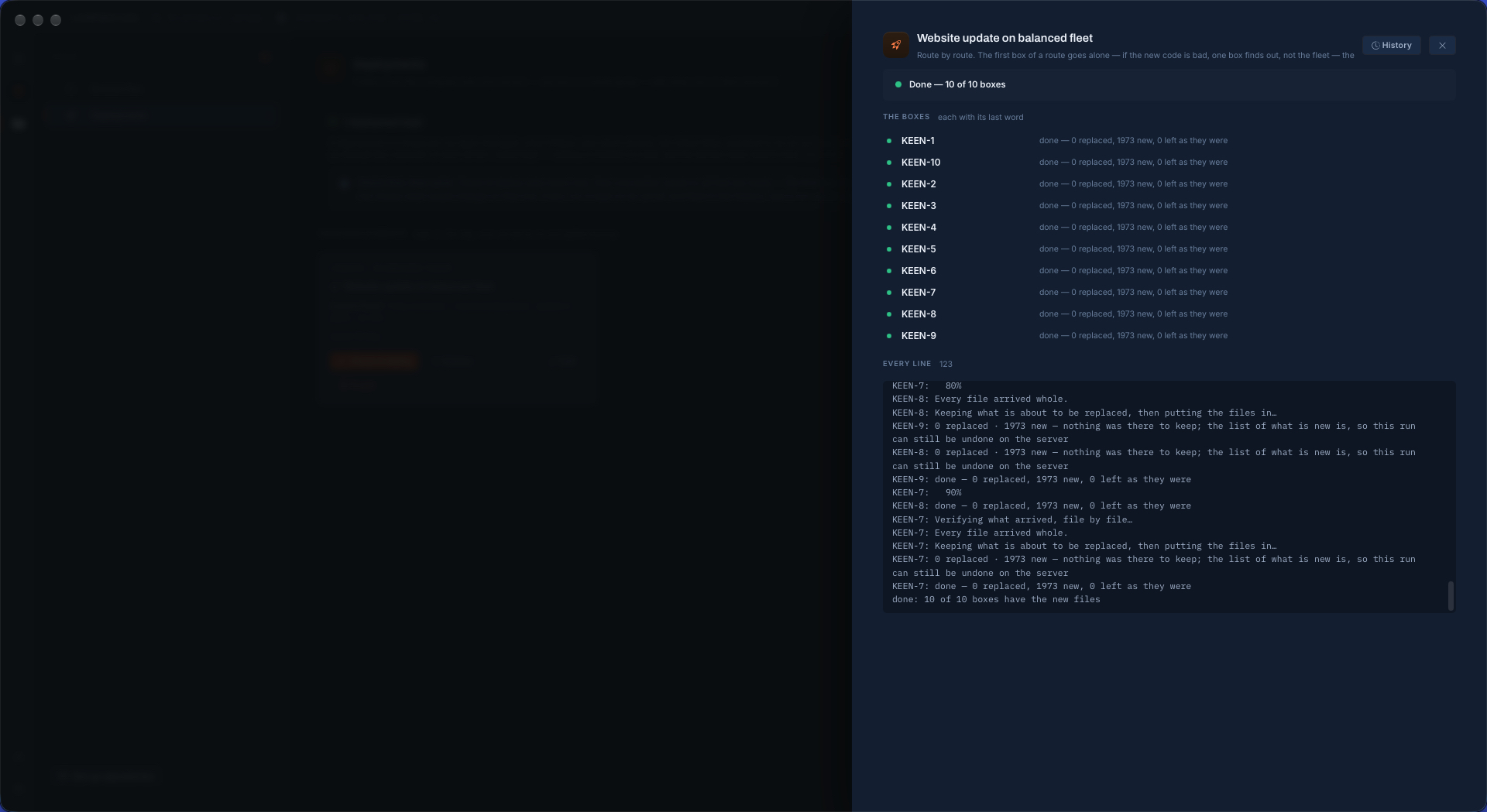
A deployment finished on ten servers in LockFlare Vigia: every box done with 1973 new files, and the log ending with 10 of 10 boxes have the new files
1,973 files onto ten servers from one button. Ten of ten done.

A recipe, not a script

Everything a shell script would hard-code is a field you can read a year later. What goes: one folder or several, and for each whether its contents land straight in the destination, the folder itself does, or a subfolder you name — shown as a real path, so the trailing-slash mistake cannot happen. Where to: servers ticked one by one, or whole groups, and a group means whoever is in it on the day, so a server added next month is included then. Into which folder, and whether a box that lacks it should have it made. As the login, or as root. What is run before the files go in and after.

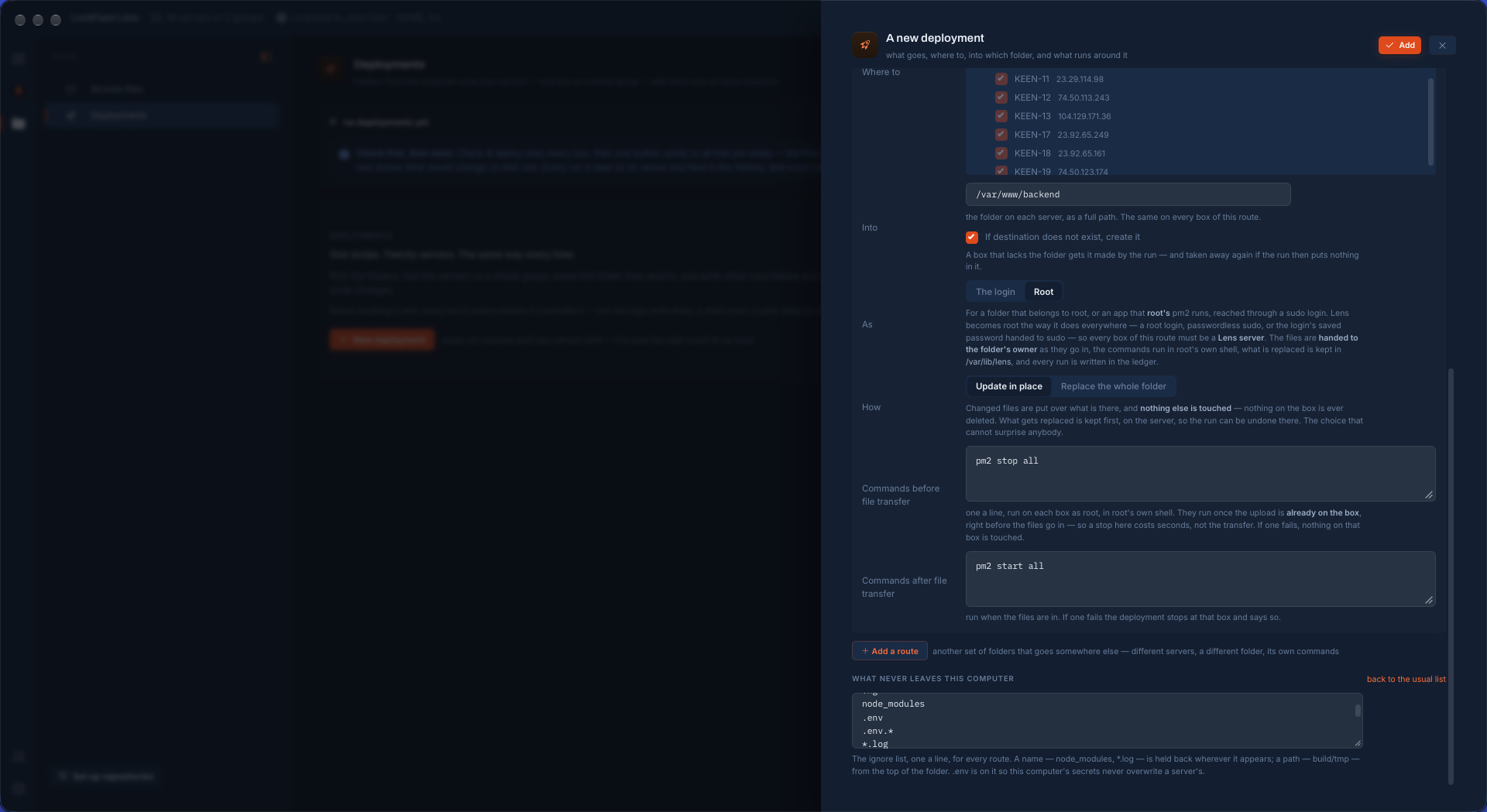
And what never leaves your computer: an ignore list, one for the whole deployment, that starts with the usual — version control, node_modules, logs, and .env, so a local secret never overwrites a server's. It is yours to empty if you mean to send everything.
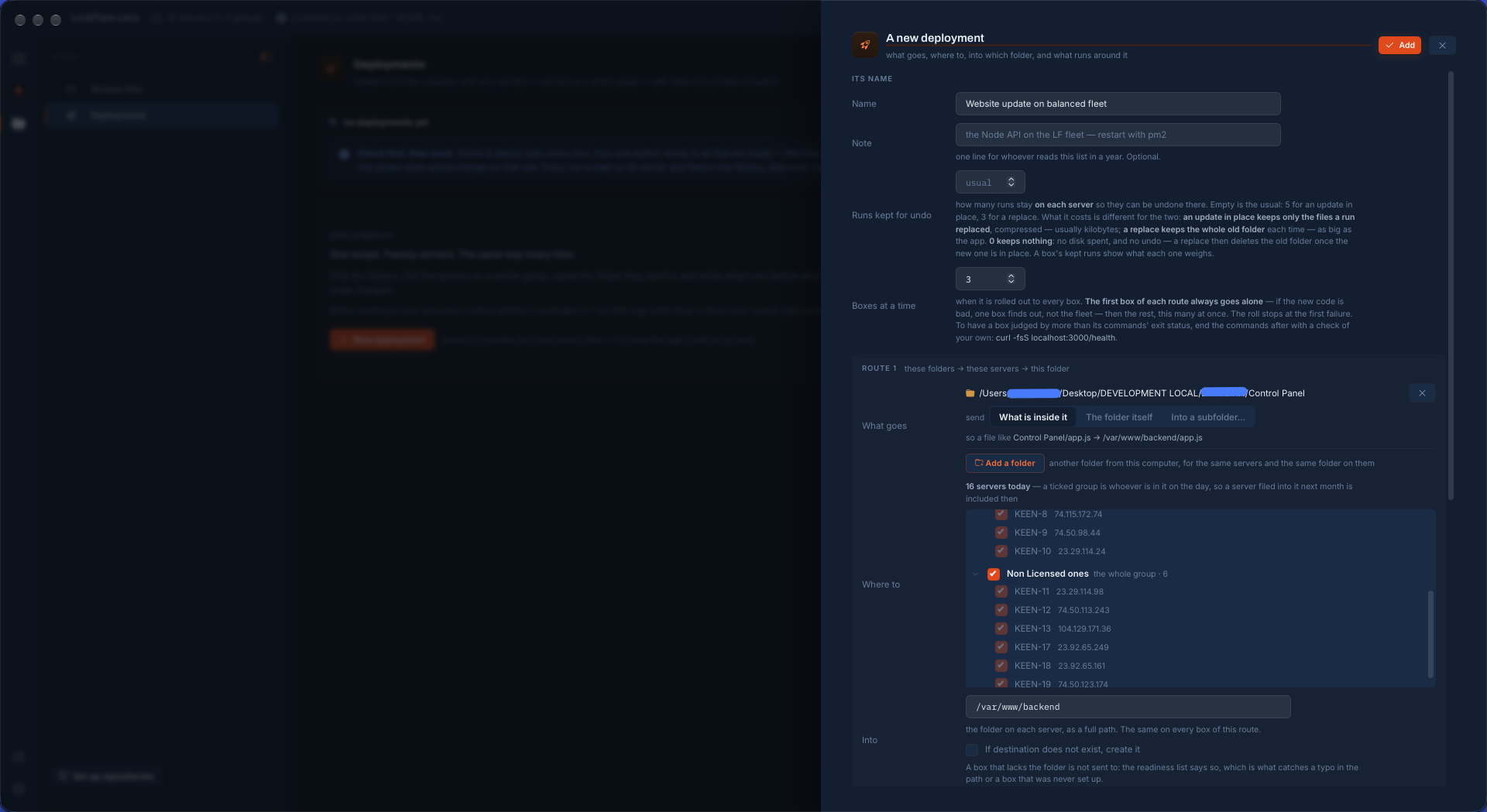
Creating a deployment in LockFlare Vigia: its name, how many runs are kept for undo, how many servers at a time, the folder to send and the sixteen servers ticked in two groups
What goes, where it lands, and the servers — ticked one by one or a whole group at once.
The rest of a deployment recipe in LockFlare Vigia: the destination folder with create it if missing, run as root, update in place, commands before and after the transfer, and the ignore list
The folder on each server, as the login or as root, the commands around the transfer, the ignore list.

Not only code

A deployment moves a folder and runs what you tell it around the move. What is in the folder is your business.

An application

A Node, PHP or Python app onto every server behind a balancer: stop it before the files go in, install and start it after. The stop costs seconds, because by then the upload is already on the box.

A website

A built site onto a pool of web servers, every one of them byte for byte the same, with the build cache and the logs held back by the ignore list.

Configuration, to a whole fleet

The same conf.d onto twenty boxes as root, each file handed to the folder's owner as it lands, then a test and a reload as the command after. A box where the test fails is where the roll stops.

Scripts and scheduled work

One folder of maintenance scripts, identical everywhere; a file that was already on a server keeps the mode that server gave it. Change one line and only that file travels, and what already matches is left alone.

Certificates and keys

A renewed certificate onto every server that serves it, then the reload. Vigia warns on the last screen before sending when something in the folder looks like a secret, so nothing of the kind goes out by accident.

Assets and data files

A folder of media, models or game assets to the boxes that use them. The first roll moves all of it; after that, a change is the size of the change.

Every server is asked before anything is sent

Check & deploy asks every box of every route at once, as its own login, and changes nothing by asking. Can this login write that folder, and if not, who owns it. Is the folder there, and if not, will it be made. Is there room for the new files and for what they replace. Are the programs your commands call really on that box — looked for in the same shell the commands will run in, which is where a program installed under a version manager lives and a bare SSH command never finds it. Would a sudo in the commands stop and wait for a password nobody can type.

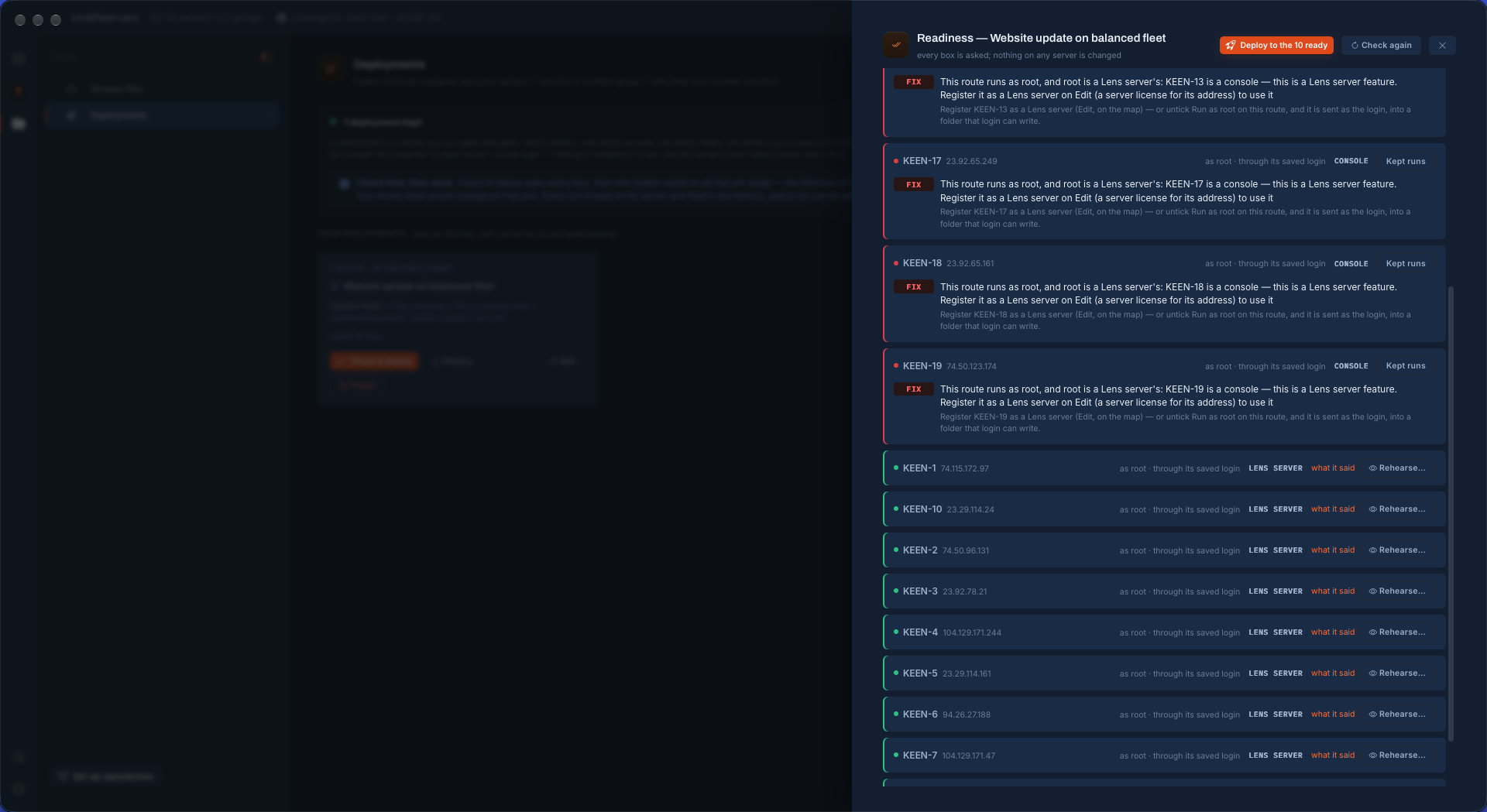
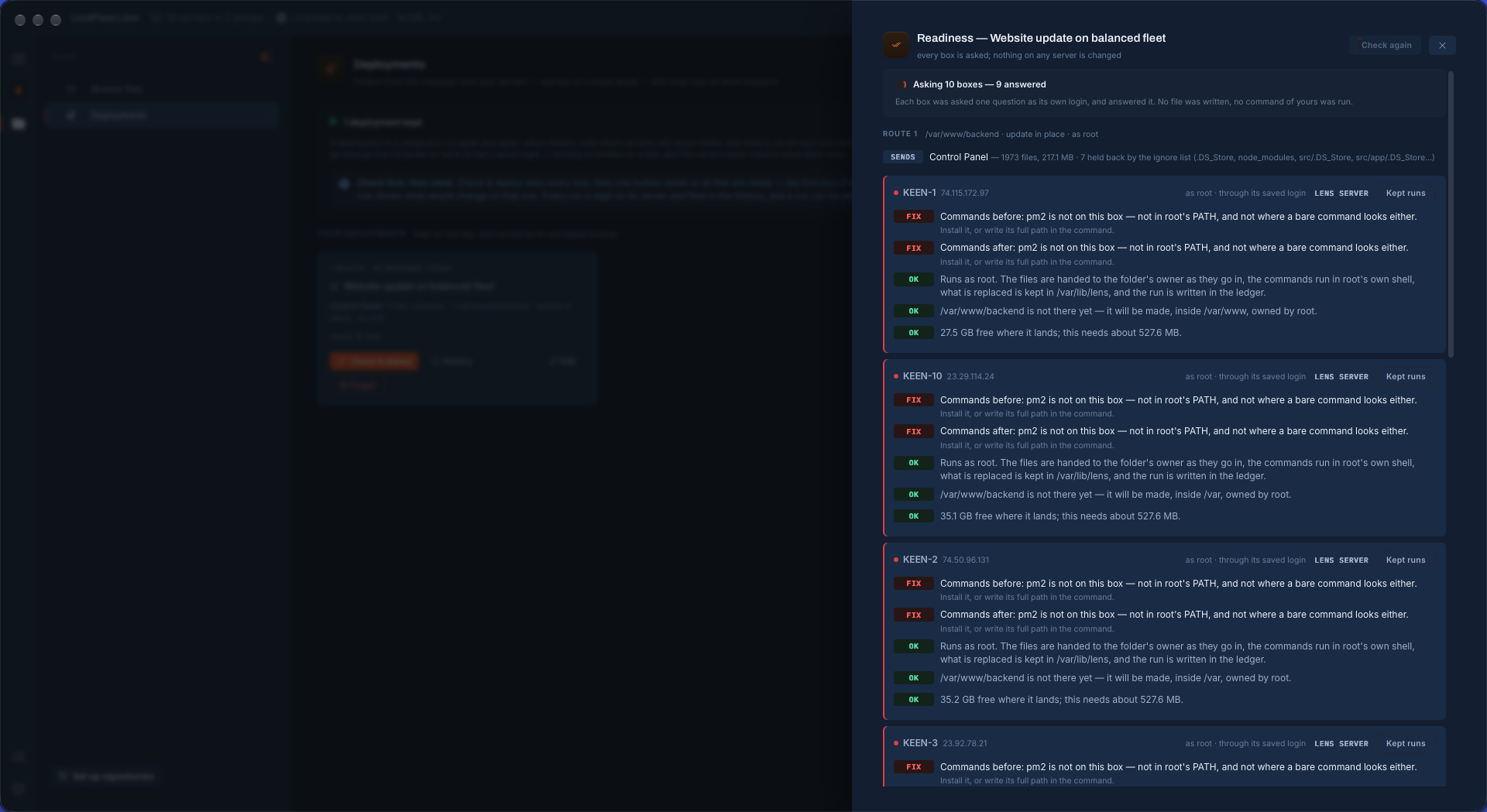
The answer is one list, what needs fixing first, with the fix beside each line. These screens are from a real run. Six of sixteen servers were consoles, and a route that runs as root is refused on a console by name — so the button reads "Deploy to the 10 ready" and says who is left out. Then the list caught that the commands called a program none of the ten boxes had, before anything had been stopped to find that out.

10servers, asked at once
1,973files counted after the ignore list, 217.1 MB
0bytes written to any server by the check
The readiness list of a deployment in LockFlare Vigia: six console servers refused because the route runs as root, with the fix beside each, and the button offering to deploy to the ten that are ready
Six consoles refused by name, with the way out. Ten are ready.
LockFlare Vigia finding, before a deployment runs, that the program its commands call is not installed on any of the servers, with room and the destination folder checked on each
The commands call a program these boxes do not have. Found before anything was touched.
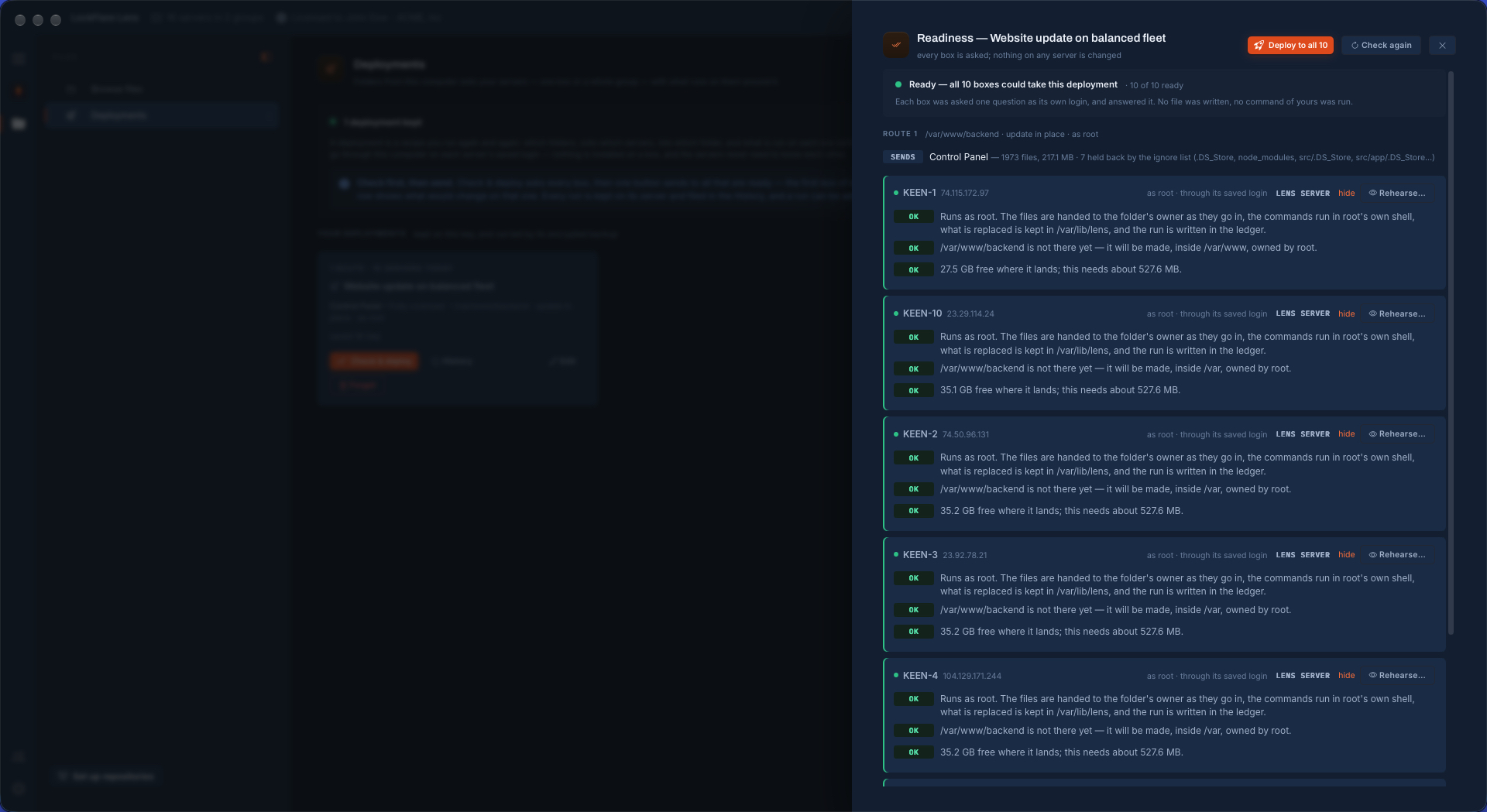
A deployment's readiness list in LockFlare Vigia with all ten servers ready: running as root, the destination folder to be made, and the free space against what the run needs
Fixed, asked again: ten of ten ready, and one button for all of them.

The first server goes alone

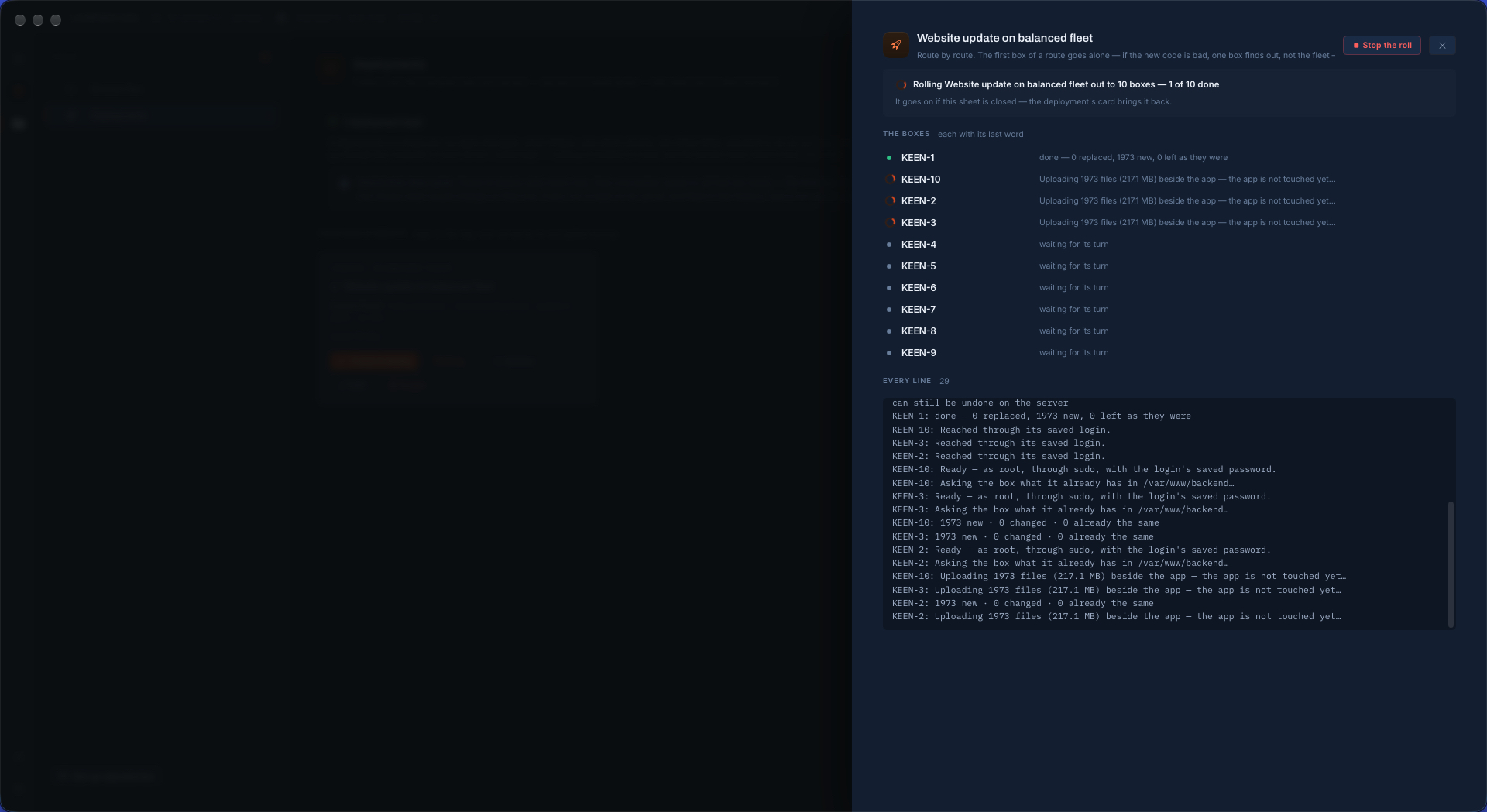
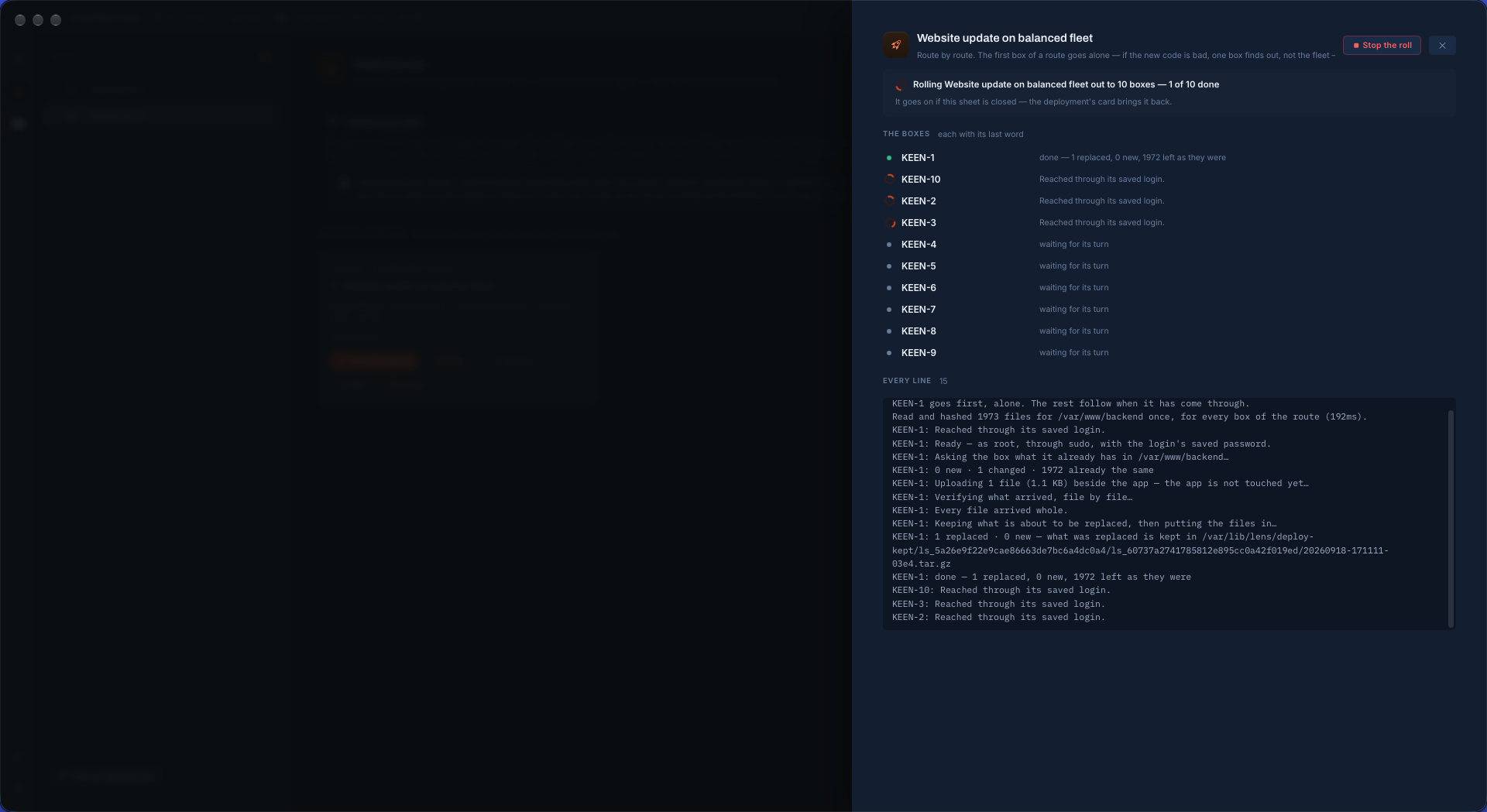
One button sends to every ready box, route by route. The first server of a route goes by itself: if what you are sending is bad, one box finds out, not the fleet. When it has come through, the rest follow a few at a time — three unless you say otherwise — and the roll stops at the first failure. Servers already working finish their run, none is started after, and every server that never had its turn is said to have been skipped.

On each box the network never touches the live folder. What is new or changed is uploaded into a holding folder beside it and verified there, file by file, by hash. Only then do your commands before run, what is about to be replaced is kept, and each file is renamed into place. A link that drops halfway leaves a folder to delete and nothing else. Putting the files in place is renames on the server's own disk, not a transfer — and that, not the upload, is how long something stopped for the change stays stopped.

A deployment rolling out to ten servers in LockFlare Vigia: the first server done alone, three more uploading 1973 files beside the app, and six waiting for their turn
The first box done, alone. Three uploading beside the live folder. Six waiting their turn.
The finished roll in LockFlare Vigia: ten of ten servers done, each with 1973 new files, and every line of the run kept below
Ten of ten, each box with its last word, and every line of the run kept.

The second time, only what changed

Vigia does not compare dates or sizes. It hashes every file on your computer and asks each server for the hashes of the same paths — only those, so what you are not sending is never read. A file with one character changed is found; a file that was only re-saved is not sent. Here one file out of 1,973 had been edited, and that is exactly what travelled.

192 msto read and hash 1,973 files, once, for every box of the route
1file sent to each server — 1.1 KB, not 217 MB
1,972left exactly as they were

The file it replaced was kept first, on the server, so the run can be undone there. A roll hashes a route's files once and judges every box against that one list — so a file edited in the middle of a roll fails its verification on the next box instead of landing, changed, on half the fleet.

Running a deployment again in LockFlare Vigia: 1973 files hashed in 192 milliseconds, one changed and 1972 already the same, one file of 1.1 kilobytes uploaded, and what it replaced kept on the server
One changed, 1,972 already the same. One file uploaded, and what it replaced kept.
The second roll finished in LockFlare Vigia: on each of ten servers one file replaced, none new and 1972 left as they were
On all ten: one replaced, none new, 1,972 left as they were.

A history, and a way back

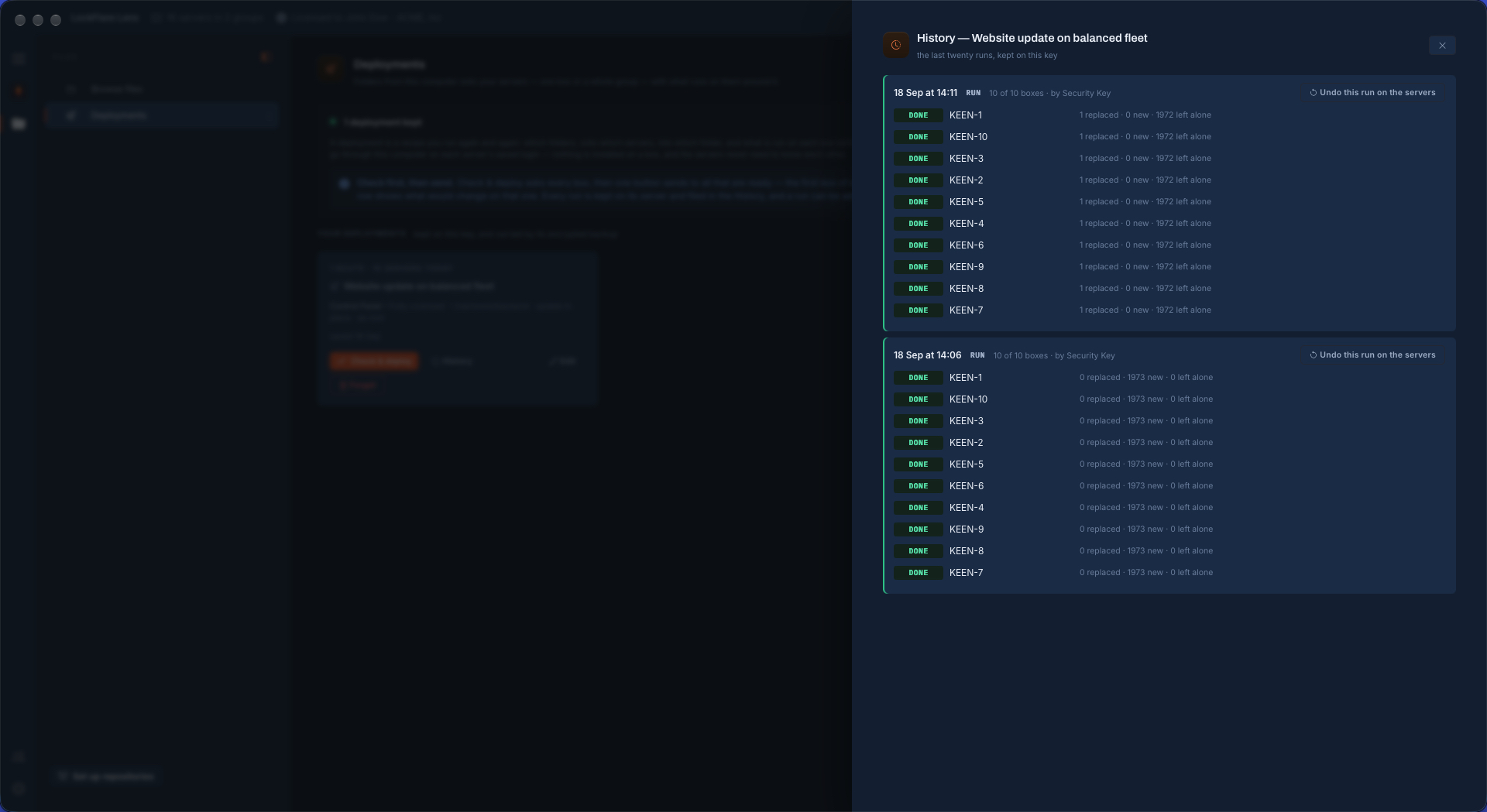
What every run did is kept, server by server: how many files were replaced, how many were new, how many were left alone, and what stopped a box that did not make it. The last twenty runs of each deployment, on your key, carried by its encrypted backup.

  • Undo this run on the servers is one press for a whole roll, or one server at a time from its own page. What the run replaced is restored, what it created is removed with the folders it made, and your commands run around it. Nothing on your computer is touched.
  • An undo does not stop at a failure: every server where it can be undone is, and any where it could not is named at the end.
  • How many runs stay on each server is yours to set, from five to none. An update in place keeps only the files a run replaced, compressed — usually kilobytes — and each server shows what its kept runs weigh.
  • If putting the files in fails halfway on a box, Vigia puts that box back by itself. Nobody is handed a half-deployed server.
The history of a deployment in LockFlare Vigia: two runs across ten servers with what each did on every box, and a button to undo a whole run on the servers
Two runs, ten servers each, and a whole run undone in one press.

And then look for yourself

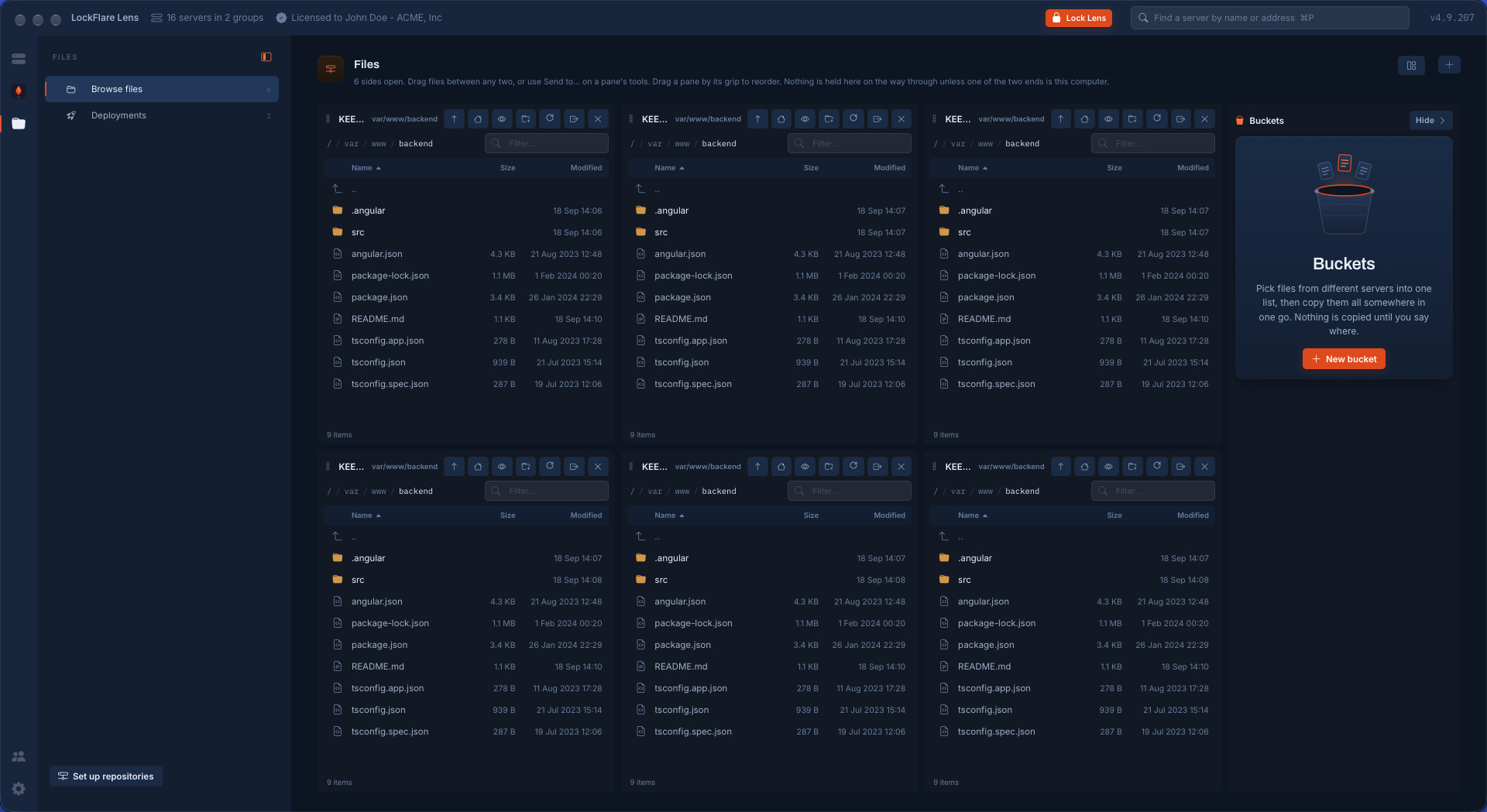
Vigia already opens any server's files over the same login, six panes to a page. After a roll, the destination on six servers side by side is one screen: the same names, the same sizes, and the one file that changed carrying the same date on every box.

Six servers' copies of the deployed folder side by side in the LockFlare Vigia file browser, every pane showing the same files with the same sizes and dates
The same folder on six of the ten servers, side by side. Identical.

Two ways to send, chosen per route

Update in place

Changed files are put over what is there and nothing else in the folder is looked at. Nothing on the server is ever deleted: the box's own configuration, its uploads, its dependencies are simply not part of the conversation. The choice that cannot surprise anybody.

Replace the whole folder

A complete new folder is built beside the old one — unchanged files copied across on the server itself, not sent again — every file in it verified, and the two are swapped with two renames. The old folder is kept, whole. What the box owns and you listed to carry over is moved across with it; what is neither sent nor carried is named in the rehearsal, before there is a button to press.

As the login, or as root

As the login, a deployment is what that login could do by hand, on any box you can reach over SSH. As root — for a folder that belongs to root, or a service root runs — every file is handed to the folder's owner as it goes in, a replaced file keeps the owner and mode it had, the commands run in root's own shell, and the run is written in the ledger.

A rehearsal before a single box

Any one server can be rehearsed on its own: which files are new, which would be replaced, how many are already the same, how much goes over the wire, and the order it will happen in. Read, never written. The button to send is on that sheet, under what it will do.

What a deployment leaves on a server

The files you sent, and what is needed to undo them. No agent, no daemon, nothing listening, no tool of ours installed: the box needs tar and sha256sum, which every distribution ships.

a holding folder beside the destinationWhere the upload lands and is verified. It exists for the length of the run and is removed at the end of it, however the run ends.
~/.lens/deploy-keptAs the login: what each run replaced, as one compressed file per run, and the list of what it created. The last five runs, or as many as you chose.
/var/lib/lens/deploy-keptThe same, for a route that runs as root — Vigia's own folder on a Vigia server, never a home directory sudo may or may not have changed.
/var/lib/lens/journal.logOne line per root run: what was deployed, into which folder, how many files, and by which key.

Questions people ask

Is this only for deploying code?

No. A deployment sends a folder and runs the commands you give it before and after. Application code is one use; a built website, configuration files for a whole fleet, scripts, certificates and folders of assets are sent exactly the same way.

Does it install anything on my servers?

No. Everything runs over the SSH login you already use, with tar and sha256sum, which every supported distribution ships. There is no agent and no daemon. What stays on a server is the files you sent and what is needed to undo the last few runs.

How does it know which files changed?

By content. Vigia computes the SHA-256 of every file on your computer and asks each server for the hashes of the same paths. Dates and sizes are not used, so a one-character change is found and a file that was only re-saved is not sent again.

What happens if the connection drops halfway?

Nothing on the live folder. The upload goes into a holding folder beside the destination and is verified there before anything else happens, so a dropped link leaves a folder to delete. If putting the files in place fails halfway, Vigia restores that server by itself.

Can a deployment be undone?

Yes, on the server, in one press: for one server, or for every server of a roll from the History. What the run replaced is restored and what it created is removed, with your commands run around it. Nothing on your computer is touched.

What does it do that a loop over rsync does not?

It asks every server first and shows one list of what would go wrong, sends the first server alone and stops at the first failure, verifies every file by hash before it goes live, keeps what it replaces so a run can be undone, and keeps a history of what each run did on each box.

The folder belongs to root. Can I still deploy to it?

Yes, on a Vigia server: mark the route to run as root. Vigia becomes root the way it does everywhere — a root login, passwordless sudo, or your saved password handed to sudo — and hands every file to the folder's owner as it goes in, so nothing is left owned by root that should not be.

Which servers can it deploy to?

As the login, any server you can reach over SSH, a console included. Running a route as root is a Vigia server feature — Debian, Ubuntu, AlmaLinux or Rocky Linux — and the first 10 Vigia servers are free.

Send your first folder

Vigia is free for 10 servers. The check writes nothing, so trying it costs nothing.

Download Vigia